Kids and Coding

Tomorrow morning I am headed to Denver to speak the first meeting of the first PASS physical WIT chapter. As a representative of the PASS Virtual WIT chapter, I answered questions, asked questions, and generally was a resource available for the leaders of the group. For over four years, I have been promoting WIT panels at SQL Saturdays and have organized many of them. When I organize a WIT panel, I try to steer the topic of discussion to “Encouraging the Next Generation” because I am passionate about making sure that kids get exposed to coding.

Last week I attended the kick-off meeting of an amazing group, Coder Girls St. Louis. This group was organized to nurture technical talent in St. Louis because there are many more tech jobs than there are qualified people to fill them. This organization is actually geared towards women, but teen girls are welcome as well. In fact, my two 15 year old nieces Alexis and Jordan have signed up. I have signed up to be a mentor.

This group of about 500 women from the St. Louis area will be taking a free online class, CS50X, available from Harvard. Since I am in the middle of a book project, I don’t have time right now to take the class along with them, but I’ll try to help out where I can. Hopefully, I’ll be able to catch up in a few months.  The idea is that, by working together, the students will learn better.

Do I think that everyone must learn to code? Well, I am not sure that is possible. I do hope that everyone gets the chance to learn, though. If I didn’t get the chance to play with a TRS-80 in college, I may never have known that how much I would love coding. Writing programs became my hobby and, eventually, I was able to change careers, a career I have really enjoyed.

I am really excited about the new group in St. Louis. I hope that other cities start the same type of program.  It would be great if half of the women in the Coder Girls group end up as developers in a couple of year.

Posted in Life in IT | Leave a comment

Using Distinct with Window Aggregates

This past Saturday I presented my T-SQL Window Function Performance session at the Atlanta SQL Saturday. There were some interesting questions from the audience that didn’t actually pertain to performance. I didn’t have all the answers since there were some questions about things I hadn’t tried.

One question was about problems with using DISTINCT and windowing functions. I’m assuming that the question pertained to window aggregates, because when I experimented later with a window aggregate example, I received this error “Use of DISTINCT is not allowed with the OVER clause.”

Here is the query I tried:

SELECT COUNT(DISTINCT CustomerID) OVER(), CustomerID,     SalesOrderID
FROM sales.SalesOrderHeader
ORDER BY CustomerID;

To get around this, you could just use a CTE to get your distinct count and not use a windowing function at all. Here is a possible solution:

;WITH Cust AS(SELECT COUNT(DISTINCT CustomerID) AS CountOfCust
FROM Sales.SalesOrderHeader)
SELECT CountOfCust,
SOH.CustomerID, SalesOrderID
FROM Sales.SalesOrderHeader AS SOH
CROSS JOIN Cust;

Since window aggregate performance is not great, you may want to take this alternate approach anyway.  I keep learning new things about windowing functions, and I’ll also keep passing along what I learn.


Posted in T-SQL Window Functions | Leave a comment

SSIS Data Tap and Child Packages

Last week I covered how to add a Data Tap to the execution of a 2012 or 2014 SSIS package. What I showed you will work fine for many packages, but how do you add a Data Tap to a child package? I spent quite a bit of time trying to figure out how to do this, and the only thing I found was this sentence from Books Online:

If an execution contains a parent package and one or more child packages, you need to add a data tap for each package that you want to tap data for.

I was this close to emailing a friend on the SSIS team at Microsoft to ask about it. After some experimentation, I figured out that the add_data_tap_by_guid procedure will work to create a Data Tap in a child package. To test this, I created a project with a Master package and a Child package. The Master package just executes the Child package (Figure 1). The Child package exports a table from AdventureWorks2012 to a file.

dtcm1

Figure 1: The Master package execute the Child package

After deploying the project, the code to run the Master package can be generated by right-clicking on the Master package in SSMS and selecting Execute. Instead of running the package, click Script to generate a script. Take a look at last week’s article if you need to learn more about this.

The code to add the Data Tap to the data flow in my Child package looks like this:

EXEC [SSISDB].[catalog].add_data_tap_by_guid @execution_id,
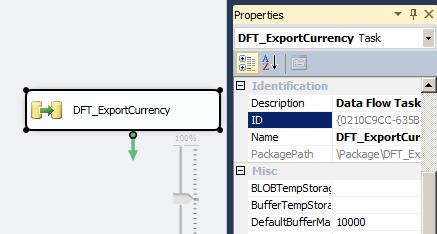
@dataflow_task_guid = ‘{0210C9CC-635B-4038-AFC4-54220909F4F3}’,
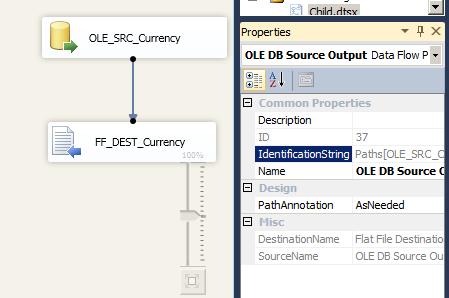
@dataflow_path_id_string = ‘Paths[OLE_SRC_Currency.OLE DB Source Output]’,
@data_filename = ‘output.txt’

The @dataflow_task_guid is the ID property of the Data Flow task in the child package (Figure 2), and the @dataflow_path_id_string is the IdentificationString property of the data flow connector or arrow in the Data Flow task layer (Figure 3).

dtcm2

Figure 2: The ID property

dtcm3

Figure 3: The IdentificationString property

Adding a Data Tap to a child package is pretty simple!

Posted in SSIS | Leave a comment