I’m back…

After three weeks off work to recover from surgery, I go back tomorrow. My commute is about 10 steps. If I actually had to drive to an office for work, I would have needed at least another week off. I am still sleeping 12 to 15 hours each night and taking pain meds, so we’ll see how it goes.

I am recovering from a life threatening illness that was luckily caught and treated early. There is no doubt at all in my mind that I’ll be around for many years to come. It seems like no matter what life throws at me, it always could have been much worse. I always end up being pretty lucky.

There is a lot of debate today about the advice to “follow your dreams” or “follow your passion”.  On the surface, it seems like good advice. Why spend your life doing something you hate or that is not fun. Unfortunately, most people’s dreams are art related. Maybe it is acting, music, or photography. Can you make a living doing those things? Well, very few people can. For most people, these pursuits can be nothing more than hobbies.

The advice I have been hearing lately is to find something you are interested in,  that you can also make a living at, and then become passionate about it. Did I dream about databases when I was a kid? Not hardly. I dreamt about writing books and being a teacher. As a teen, I developed an interest in science and decided that pharmacy would be the perfect career for me.

While I made some lifelong friends in college and developed communication skills in that career, for the most part, becoming a pharmacist is the biggest regret of my life. I am very lucky, because eventually I figured out what would really make me happy and was able to switch careers. I’m not saying it was easy or that it happened overnight. I had to figure out what to do and worked extremely hard to develop the skills. I also took a 25% decrease in pay the year I became a developer. You may be thinking that since I am woman, that pay difference was not a big deal. I am and was the sole breadwinner in my family, so it was quite a sacrifice. I have never caught up to pharmacy salaries, but you couldn’t pay me a million dollars to go back.

Taking three weeks off to rest and regenerate away from SQL Server has been good for me. SQL Server was the last thing on my mind shortly after my surgery. But now that I am ready to go back to work, I am so thankful that I get to work with such amazing technology. My work is challenging and fun. And, I also get to write books and teach just as I dreamed about when I was a child. It’s amazing how that worked out.
Posted in Life in IT | 3 Comments

How to use PIVOT

I recently explained how to write a PIVOT query to a group of new T-SQL developers. I have to admit that the syntax is complicated enough, and I use PIVOT infrequently enough, that I always have to look up how to write it. The syntax is confusing, but PIVOT is not really that difficult if you take it a step at a time.

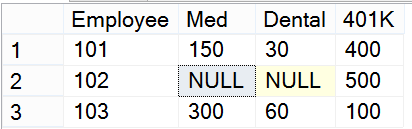
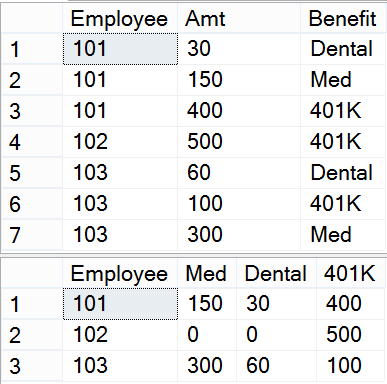
A PIVOT query turns one of the columns in a base query into column headers. The DBA who organized the training class had an example concerning benefits data. She needed to come up with a list of employees with the benefit names listed across the top. Her original data and results might look something like this:

pivot1


Here is the code to create the #benefits table:

CREATE TABLE #benefits (EmployeeINT,AmtINT,BenefitVARCHAR(10));
INSERT INTO #benefits (Employee,Amt,Benefit)
VALUES (101, 150,‘Med’),(101, 30,‘Dental’),(101, 400,‘401K’),
(102, 500,‘401K’),(103, 300,‘Med’),(103, 60,‘Dental’),(103, 100,‘401K’);

Step 1: Write the base query. This example is pretty simple, but it could involve a more complex query with joins, unions, sub-queries, or just about anything else you can think of. It might make sense to create a view of the base query to simplify the PIVOT query. Here is the base query for this example:

SELECT Employee, Amt, Benefit
FROM #benefits;

Step 2: Figure out from the results of the base query the three parts you will need, the row data, the aggregated data, and the pivoted column.

pivot2

Step 3: Turn your base query into a derived table listing the row data columns in the outer select.

SELECT Employee
FROM (SELECT Employee, Amt, Benefit
      FROM #benefits) AS A;

Step 4: Add the PIVOT function.  Specify the aggregated data in this function.

SELECT Employee
FROM (SELECT Employee, Amt, Benefit
FROM #benefits) AS A
PIVOT(
SUM(AMT


Step 5. Specify the column that will be pivoted.

SELECT Employee
FROM (SELECT Employee, Amt, Benefit
FROM #benefits) AS A
PIVOT(
SUM(AMT
    FOR Benefit

Step 6. List the pivoted values and give the PIVOT expression an alias. At this point you can run the query, but you still won’t see the pivoted columns. It is important to understand that any pivoted values you leave out will not appear in the query.

SELECT Employee
FROM (SELECT Employee, Amt, Benefit
FROM #benefits) AS A
PIVOT(
SUM(AMT
    FOR Benefit
IN([Med],[Dental],[401K])
) AS PVT;

Step 7. List the pivoted values in the outer SELECT. Run the query to see the results

SELECT Employee,[Med],[Dental],[401K]
FROM (SELECT Employee, Amt, Benefit
FROM #benefits) AS A
PIVOT(
SUM(AMT
    FOR Benefit
IN([Med],[Dental],[401K])
) AS PVT;

pivot 4

Now you may want to do some tweaking to improve the results. In this example, I would like to change the NULL values to zeros. I can use the COALESCE function to accomplish this.

SELECT Employee, COALESCE([Med],0) AS [Med],
COALESCE([Dental],0) AS [Dental], COALESCE([401K],0) AS [401K]
FROM (SELECT Employee, Amt, Benefit
FROM #benefits) AS A
PIVOT(
    SUM(Amt)
FOR Benefit
IN([Med],[Dental],[401K])
) AS PVT;

You can also add an ORDER BY clause at the end. Include any of the column names in the SELECT list.

So, it is not really that difficult to write a PIVOT query. The key is to make sure that the base query contains everything you need. Simplify it with a view if that makes sense. Then identify the three parts you will need.


;


Posted in T-SQL | Leave a comment

When should I use a stored proc and when should I use a view?

I taught an Introduction to T-SQL class this week in Colorado. It was such a great week teaching and was probably the best group of students I have ever taught. There were lots of questions, and I realized that several would make potential blog posts.

One of the students asked how she would know when to create a view and when to create a stored procedure.  One of the examples I gave concerned simplifying a pivot query. The base query could be really complex. To simplify things, it might make sense to create a view of the base query.

Since I have been doing this work for years, I instinctively know which structure to choose in each situation. We did not talk about user defined table valued functions in the class, so I won’t here, either.  Also, the students will not be updating data, just writing queries for exporting or reporting.

Here are some of the things that help me make the decision between a view and a proc in the context of this class:

Create a stored procedure when…

  • You need to pass parameters, for example, from SSRS
  • There are multiple statements involved, such as populating a temp table with intermediary results.
  • There is conditional logic involved with IF or looping with WHILE

Create a view when…

  • You need to join the saved object to another table
  • It’s just a query that you can reuse in other queries


Posted in T-SQL | Leave a comment