UPDATE: For more from me about T-SQL Window Functions, check out my Pluralsight course!
I have been speaking and writing a bunch lately on T-SQL window functions. There is always more to learn, it seems.
Framing for many of the window functions was introduced with 2012. It is very important to understand how framing works from both a performance and logical perspective. The default frame is RANGE BETWEEN UNBOUNDED PRECEDING AND CURRENT ROW. If you don’t specify a frame where it is supported this is what you will get. Using this default will give you worse performance than if you specify ROWS BETWEEN UNBOUNDED PRECEDING AND CURRENT ROW. It might also give you results that you do not expect as well.
Window aggregate functions were introduced with 2005 and supported only the PARTITION BY option in the OVER clause. This allows you to add summary calculations without losing detail. In 2012, the ORDER BY option and framing were added to the OVER clause for window aggregate functions. The ORDER BY allows you to calculate accumulating values or “running totals”.
The following query demonstrates both the 2005 and 2012 functionality. It shows a subtotal for each CustomerID without a GROUP BY clause. The query also demonstrates the ORDER BY option available with 2012 which returns a running total for each CustomerID. I have written the running total in the simplest way which actually has the RANGE BETWEEN UNBOUNDED PRECEDING AND CURRENT ROW frame.
SELECT CustomerID, SalesOrderID, TotalDue, OrderDate,
	SUM(TotalDue) OVER(PARTITION BY CustomerID) CustomerTotal,
	SUM(TotalDue) OVER(PARTITION BY CustomerID ORDER BY SalesOrderID)
             CustomerRunningTotal
FROM Sales.SalesOrderHeader;

In this blog, let’s forget about performance and think about the results. If the column or combination of columns specified in the ORDER BY option is not unique, then the results will surprise you. To demonstrate this, we first need to find a couple of customers with multiple orders on the same day. The customer I chose for this example is 11300.
SELECT COUNT(*), CustomerID, OrderDate
FROM Sales.SalesOrderHeader
GROUP BY CustomerID, OrderDate
HAVING COUNT(*) > 1;
If I run the query filtered for customer 11300 and change the ORDER BY option to OrderDate, the CustomerRunningTotal is not what I was expecting on the days with multiple orders.
SELECT CustomerID, SalesOrderID, TotalDue, OrderDate,
	SUM(TotalDue) OVER(PARTITION BY CustomerID) CustomerTotal,
	SUM(TotalDue) OVER(PARTITION BY CustomerID ORDER BY OrderDate)
            CustomerRunningTotal
FROM Sales.SalesOrderHeader
WHERE CustomerID = 11300;

The explanation I had heard was that ROWS is a physical operator while RANGE is a logical operator. For duplicate OrderDate rows, RANGE causes the window to be the same for the two rows with the same date. To fix this problem either switch from the default RANGE to ROWS or to make sure that the ORDER BY column is unique. Either of these queries will return a real running total.
SELECT CustomerID, SalesOrderID, TotalDue, OrderDate,
	SUM(TotalDue) OVER(PARTITION BY CustomerID) CustomerTotal,
	SUM(TotalDue) OVER(PARTITION BY CustomerID ORDER BY SalesOrderID)
                  CustomerRunningTotal
FROM Sales.SalesOrderHeader
WHERE CustomerID = 11300;

SELECT CustomerID, SalesOrderID, TotalDue, OrderDate,
	SUM(TotalDue) OVER(PARTITION BY CustomerID) CustomerTotal,
	SUM(TotalDue) OVER(PARTITION BY CustomerID ORDER BY OrderDate
		ROWS BETWEEN UNBOUNDED PRECEDING AND CURRENT ROW)
              CustomerRunningTotal
FROM Sales.SalesOrderHeader
WHERE CustomerID = 11300;
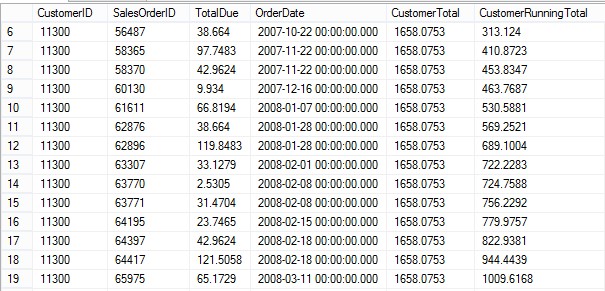
For some time, I wondered why what is obviously meant to be a running total would be implemented as it is with RANGE. One thing to note about RANGE is that there is more functionality in the standard that is not implemented yet in SQL Server. RANGE and ROWS are meant for different things. Another thing I realized is the that the difference between ROWS and RANGE is similar to the difference between ROW_NUMBER and RANK. ROW_NUMBER will return a unique set of numbers over the window while RANK will return the same value when there are duplicate values in the ORDER BY column or columns.
I was recently comparing the performance between window functions and more traditional ways to solve the same problems. One way to return the running total is with a correlated sub-query. The performance of this method is terrible, and doesn’t scale well at all. It does, however, help explain the difference between ROWS and RANGE.
Here is a query using the old method for running totals that uses the non-unique OrderDate column to determine which rows to add up. When I do this, I get the same results as when I use OrderDate with the default RANGE.
SELECT CustomerID, SalesOrderID, TotalDue, OrderDate,
	(SELECT SUM(TotalDue) AS CustomerRunningTotal
		FROM Sales.SalesOrderHeader
		WHERE CustomerID = A.CustomerID
			AND OrderDate <= A.OrderDate
		) AS CustomerRunningTotal
FROM Sales.SalesOrderHeader A
WHERE CustomerID = 11300;
Make sure that you do two things: 1. specify the frame when it is supported, don’t use the default frame unless it is really what you need. 2. Use a unique column or combination of columns in the ORDER BY option in those situations where unique results are required such as in running totals.
I will be delivering a half-day (3 hours) Window Function Deep Dive session at the PASS Summit. I hope to see you there!


 Aunt Kathi's SQL Server Home