
Back when I first began working with SQL Server in 1998, the databases I worked with could be measured in megabytes. I remember being a bit concerned when a database for one of my customers approached 1 GB. In today’s world, I consider databases under 100 GB to be relatively small. I am not surprised when I work with customers who have databases measuring in the terabytes.
Over the years, Microsoft has added features that help database administrators handle large databases and large tables. The latest feature on the horizon, available with SQL Server 2016, is Stretch Databases. This feature will allow a table to be divided between on premises instances and the Azure cloud. Data that is not access frequently can be stored in Azure, and it is seamless!
Two of the features that have been around for years to help manage large tables are Partitioned Views and Partitioned Tables. The Partitioned Table feature is only available in Enterprise and Developer Editions. A partitioned table is one table but, under the covers, it is divided into multiple partitions that can be managed individually. You can quickly move data in and out of the table, store partitions on different storage tiers, compress partitions at different levels, and rebuild indexes on individual partitions. When you query the table, it looks like a regular table. If you filter on the partition key column, you can get a boost in performance because SQL Server can ignore partitions not needed in your results. It’s a great way to break a large problem down to smaller, more solvable pieces, but it’s not necessarily easy to set up. It also requires the often dreaded Enterprise Edition.
I was looking for a way to accomplish something similar that would still work without the cost of upgrading when I took a look at Partitioned Views. I had never really looked seriously at this feature since I thought it was mostly a convenience. I didn’t think there was any performance advantage. The idea behind partitioned views is that you will have two or more tables with identical schemas, and you will use UNION ALL to combine the tables in a view. Now you can use the view to select the data instead of specifying the actual tables.
When creating a partitioned view, you could place a table containing older data on slower, less expensive storage. You could place the most active data in a table living on faster storage, such as on solid state disks. Adding new data to the partitioned view could be pretty quick as well. It may mean just modifying the view definition to include a new table. What I had not realized, however, is that, if you design the tables correctly, you can also see a performance advantage. SQL Server can ignore tables not needed in the results of a SELECT query when filtering on the key that divides the data.
To demonstrate, run the following script to create and populate two tables. This example is simple, but we could place each table into a different file group and even a different storage tier.
IF EXISTS(SELECT * FROM sys.views WHERE name = ‘SalesData’)
DROP VIEW SalesData;
GO
IF EXISTS(SELECT * FROM sys.tables WHERE name = ‘DataArchive’)
DROP TABLE DataArchive;
GO
IF EXISTS(SELECT * FROM sys.tables WHERE name = ‘DataActive’)
DROP TABLE DataActive;
GO
CREATE TABLE DataArchive (
SalesDate DATE, OrderID INT
CONSTRAINT PK_DataArchive PRIMARY KEY (SalesDate, OrderID)
);
CREATE TABLE DataActive (
SalesDate DATE, OrderID INT
CONSTRAINT PK_DataActive PRIMARY KEY (SalesDate, OrderID)
);
INSERT INTO dbo.DataArchive( SalesDate, OrderID )
VALUES (‘2014-01-01’, 10),(‘2014-01-10’, 20),
(‘2014-03-15’, 30), (‘2014-07-20’, 40);
INSERT INTO dbo.DataActive( SalesDate, OrderID )
VALUES (‘2015-01-07’, 50),(‘2015-02-10’, 60),
(‘2015-03-18’, 70), (‘2015-10-28’, 80);
GO
Now you have two tables, one for older data that you won’t need to access frequently, and one for active data. The next step is to create the partitioned view.
CREATE VIEW SalesData WITH SCHEMABINDING AS (
SELECT SalesDate, OrderID
FROM dbo.DataArchive
UNION ALL
SELECT SalesDate, OrderID
FROM dbo.DataActive
);
GO
To test the performance of the partitioned view, use STATISTICS IO. It will show exactly which tables are being accessed. Run this query and check the Messages tab.
SET STATISTICS IO ON;
GO
SELECT SalesDate, OrderID
FROM SalesData
WHERE SalesDate = ‘2015-01-07’;
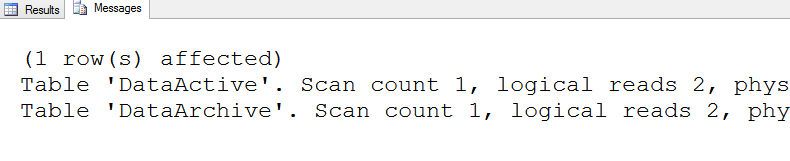
Even though the data returned by the query came from the DataActive table, SQL Server also searched the DataArchive table. To fix this issue, you must add check constraints to the tables which will allow SQL Server to ignore tables that are not needed in a particular query. You should also refresh the view definition. Make the changes and run the query again.
ALTER TABLE dbo.DataActive ADD CONSTRAINT
CC_DataActive_SalesDate CHECK (SalesDate >= ‘2015-01-01’);
ALTER TABLE dbo.DataArchive ADD CONSTRAINT
CC_DataArchive_SalesDate CHECK (SalesDate < ‘2015-01-01’);
GO
ALTER VIEW SalesData WITH SCHEMABINDING AS (
SELECT SalesDate, OrderID
FROM dbo.DataArchive
UNION ALL
SELECT SalesDate, OrderID
FROM dbo.DataActive
);
GO
SELECT SalesDate, OrderID
FROM SalesData
WHERE SalesDate = ‘2015-01-07’;

This time, SQL Server ignores the DataArchive table, and the query can run faster because SQL Server is doing less work.
What about data modifications? It seems like you would have to make those directly to the underlying tables, but that is not the case. As long as you filter on the column that divides the data, you can also make updates. I did see that it might be better to make the changes directly to the tables to get the best performance. I was also surprised to see that I could move a row from one table to another by changing the constrained column. Run the following code to try it out:
INSERT INTO SalesData(SalesDate, OrderID)
VALUES(‘2014-01-13’,26),(‘2015-01-08’,51);
UPDATE SalesData SET OrderID = 23
WHERE SalesDate = ‘2014-01-13’;
DELETE FROM SalesData
WHERE SalesDate = ‘2014-01-13’;
–Moves the row to DataActive
UPDATE salesdata
SET salesdate = ‘2015-01-01’
WHERE salesdate = ‘2014-01-01’;
Conclusion
Depending on how you design them, partitioned views can have some of the same advantages of partitioned tables. No matter which technique you decide to use, you need to spend the time up front designing and planning the solution. The most important decision in each case is the column that will be used to divide the data.
Kathi Kellenberger is the author of Beginning T-SQL, Expert T-SQL Window Functions on SQL Server, and the Pluralsight course T-SQL Window Functions.


 Aunt Kathi's SQL Server Home